How long has Linux been around?
Linux began in 1991 as a personal project by Finnish student Linus Torvalds “to create a new free operating system kernel”. The resulting Linux kernel has been marked by constant growth throughout its history.
What’s a distro (distribution)?
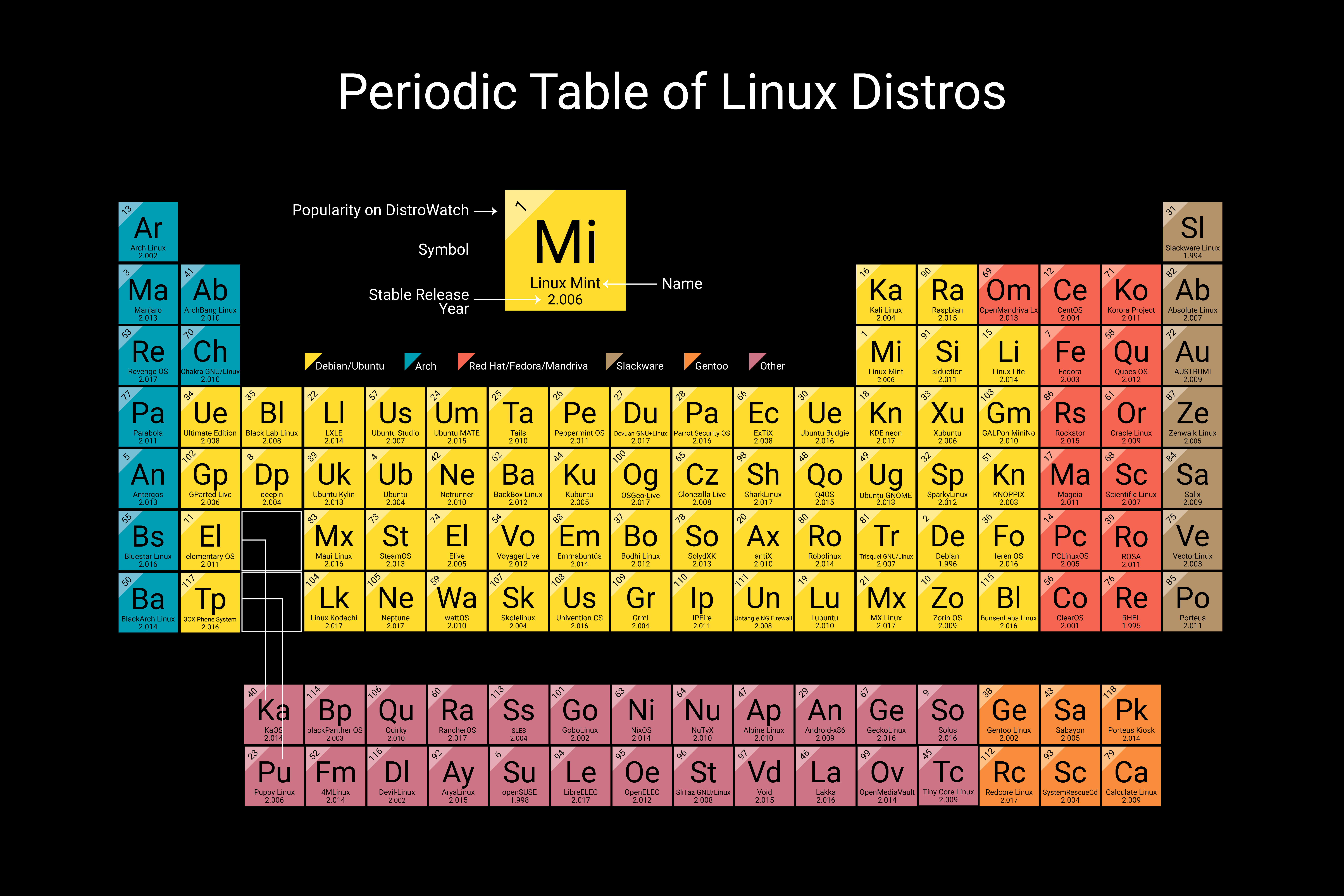
There are three main “families” of Linux distributions:
Debian, Red Hat, and SUSE
Most other Linux distributions use one of these three distributions as their foundation.
Let’s take a look at each of these families.
Debian
Debian, which dates all the way back to 1993, is one of the oldest Linux distributions still being developed today. Presently, the most popular Debian-based system is Ubuntu.
Ubuntu, distributed by the UK-based company Canonical, is one of the most popular Linux distributions available today. It is free to download, install and use. Ubuntu is packaged in three different editions - Server, Desktop, and Core.
The default desktop environment, as of 2019, is Gnome 3. In recent years Ubuntu also supported the Canonical-developed Unity desktop environment as well. The default front-end package manager for Debian distributions is APT.
Because it is generally understood as a very simple operating system to install, many first-time Linux users start by using Ubuntu. Some popular Windows applications, such as the Firefox web browser and Thunderbird email client, can be run on Ubuntu. Ubuntu offers new releases every six months, with major long-term support (LTS) releases available every two years.
Red Hat
Red Hat’s Linux offerings come in three different main forms.
- Red Hat Enterprise Linux (RHEL) is the flagship operating system, and is used on servers everywhere. CentOS is the free version of Red Hat Enterprise Linux.
- CentOS offers the same packaging as RHEL, but it doesn’t come with the same support that Red Hat Enterprise Linux offers. All support for the CentOS distribution is community-driven via technical forums.
- Fedora is sponsored by Red Hat, and offers newer, bleeding edge features that are not yet available in RHEL.
Red Hat Enterprise Linux was first released in 2002. It is developed and licensed by Red Hat. Unlike Ubuntu’s server operating system, it is not free. One license of the Red Hat Enterprise Linux Server with “self-support” costs $349 (prices increase for additional levels of support and add-ons). Many businesses find that the level of support offered by Red Hat makes the cost of the operating system worth the investment.
Administrators who want the RHEL operating system but don’t want to pay for it can use CentOS instead. CentOS was originally released in 2004, and Red Hat officially took it over in 2014. Red Hat doesn’t offer any official support for the CentOS distribution, but there is a large community of users on the internet that continue to share information and support each other.
Fedora is another distribution supported by Red Hat. Like CentOS, Fedora is also free to install and use. Fedora will generally offer features before they become available in the RHEL operating system. Like Ubuntu, Fedora offers both Workstation and Server editions.
All three of the main Red Hat distributions have a few things in common. The Red Hat Enterprise Linux, CentOS, and Fedora operating systems use YUM as the default front-end package manager. All three distributions also feature Gnome as the default desktop environment.
SUSE
SUSE Linux, while not as popular as Debian-based Ubuntu or any of the Red Hat distributions, is still considered to be one of the mainstream Linux distributions. SUSE was originally founded as a Unix-type system in Germany in 1992. Since then, it has changed hands a number of times, and is now owned by EQT, a Swedish private equity group.
There are two distributions that fall under the SUSE family - SUSE Enterprise Linux and the more popular OpenSUSE.
OpenSUSE is the freely offered edition, and still features the latest updates. SUSE Enterprise Linux, the commercially priced edition, offers features that OpenSUSE does not, such as a high availability edition and support services.
OpenSUSE has two editions - Tumbleweed and Leap.
Leap offers stable releases about every six months, while Tumbleweed is continuously updated. OpenSUSE traditionally featured KDE as its default desktop environment, but now allows users to select either the Gnome or KDE environment upon installation. T The default front-end package manager for all OpenSUSE editions is YaST.
Smaller-Scale Distributions
While Debian-based Ubuntu, SUSE, and the Red Hat distributions take up most of the Linux market share today, there are a few additional smaller distributions worth mentioning as well, including Arch Linux, Slackware, and Gentoo:
- Arch Linux is a simple, bare-bones distribution. Users that want to add packages will have to do so following the installation of the operating system, as there are not many packages included on initial install. Arch Linux users see this bare-bones installation as a feature, not a bug. There is no default desktop environment, and due to Arch Linux’ embracing of rolling releases, there are no major editions.
- Gentoo Linux is a highly customizable Linux distribution. Unlike many other Linux distributions, all source code is compiled locally on the user’s computer. Gentoo’s most famous family member is Google’s ChromeOS, the operating system that every Chromebook is built upon.
- Slackware is one of the older versions of Linux, dating back to 1993. Because of its age, many other Linux systems have been based off of this system. Slackware offers no default desktop environment, making it difficult to use for first-time users and is mostly popular with long-time Linux administrators.
Conclusion
Linux isn’t just one operating system. It’s a large family tree of different operating systems, or distributions. When deciding on the best distribution for you, it’s important to understand what options are available, and what sets each distribution apart.
Be sure that you have a good idea which package managers meet your needs, and which desktop environments you prefer. Have an understanding, too, of what type of support you’ll need for your system, and of your system’s purpose. Finally, be honest with yourself about your level of Linux expertise. Some distributions are easier to use than others.
Once you have an understanding of all of the above, you will be able to narrow down your distribution choices, and pick out the system that will be the best fit for you.